



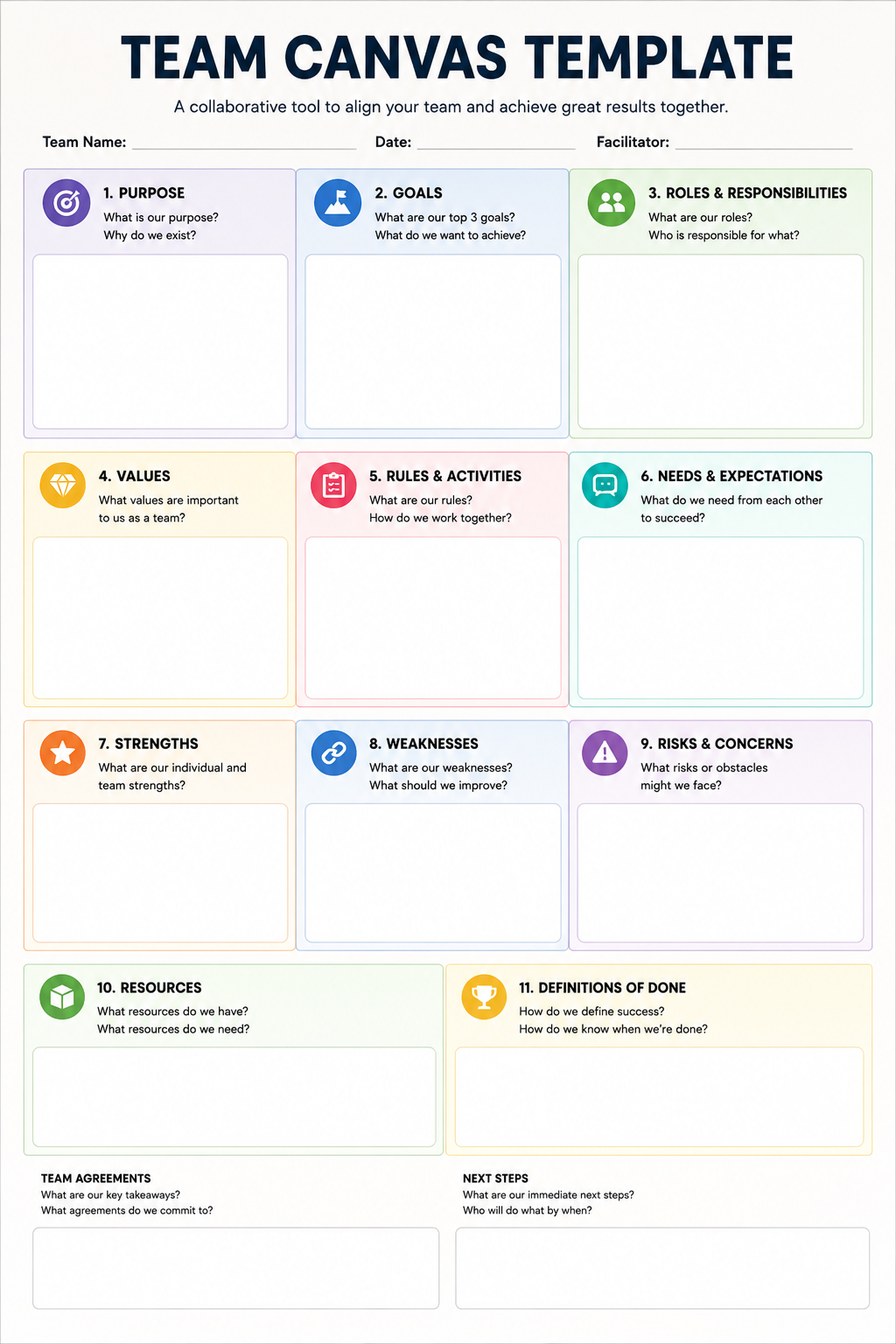
A team canvas template is a visual framework designed to align team members on purpose, goals, roles, and working agreements in a single, collaborative session. Adapted from the Business Model Canvas, this template transforms vague intentions into clear, documented commitments. It provides a structured conversation that helps teams articulate their collective identity—moving beyond who does what, to why they exist and how they will succeed together.
The modern workplace demands that teams form, disband, and reform with increasing speed. Remote and cross-functional teams often struggle with a lack of shared context, leading to duplicated effort, missed deadlines, and simmering conflict. The team canvas addresses these challenges head-on. It serves as both a diagnostic tool for struggling teams and a blueprint for newly formed groups.
This guide is your definitive resource for the team canvas template. Whether you are an Agile coach, a product manager, or a team leader, you will find everything you need to run a successful workshop. We will explore the complete framework, step-by-step facilitation guides, comparisons to similar tools, and the best templates available across different platforms. By the end, you will be equipped to take any team—remote or co-located—from confusion to clarity in under two hours.
Table of Contents
- What Is a Team Canvas Template?
- Why Teams Use a Team Canvas
- Benefits of Using a Team Canvas Template
- Team Canvas Components
- How to Fill Out a Team Canvas Template Step-by-Step
- Team Canvas Template Example
- Team Canvas vs Team Charter
- Team Canvas vs Business Model Canvas
- Team Canvas vs Project Canvas
- Best Free Team Canvas Templates
- Team Canvas Workshop Guide
- Team Canvas for Remote Teams
- Team Canvas for Agile Teams
- Team Canvas for Startups
- Team Canvas for Schools
- Team Canvas for Nonprofits
- Team Canvas for Corporate Teams
- Tips to Get the Best Results
- Common Mistakes
- Frequently Asked Questions
- Conclusion
What Is a Team Canvas Template?
At its core, a team canvas template is a one-page visual chart that captures the essential elements of a team’s identity and operational structure. It is a collaborative workshop framework developed by Alex Ivanov and Mitya Voloshchuk, inspired by the strategic management principles of the Business Model Canvas. The framework is designed to facilitate structured conversation, bringing team members together to align on what they are doing, why they are doing it, and how they will operate.
Instead of a rigid document imposed by management, the team canvas is a living tool created by the team, for the team. It maps out key areas such as purpose, goals, roles and responsibilities, values, needs, and potential risks. The canvas acts as a social contract, a reference point for daily decision-making, and a tool for conflict resolution. It is versatile and can be adapted for teams of any size, from a five-person startup to a large cross-functional corporate unit.
Why Teams Use a Team Canvas
Teams typically turn to a team canvas when they need to establish a foundation of trust and alignment. The reasons for using it are practical and often urgent:
1. Building a New Team
The most common use case is team creation. When a group forms, members often do not know each other’s working styles, motivations, or expectations. The canvas provides the first shared artifact, creating a common language from day one .
2. Clarifying Goals and Performance
When a team feels stuck, lacks direction, or is underperforming, the canvas helps to recalibrate. By revisiting the common goals and purpose, the team can diagnose whether they are working on the right things and adjust their strategy accordingly .
3. Onboarding New Members
Integrating a new member can disrupt established dynamics. Using the canvas during onboarding ensures the new hire understands the team’s context, values, and rules. It also allows existing members to re-evaluate their agreements, ensuring they remain relevant .
4. Resolving Conflict
A lot of team conflict stems from unclear roles, misaligned expectations, or a lack of psychological safety. The structured nature of the canvas allows these issues to surface in a neutral, constructive environment, enabling the team to address them head-on .
5. Re-aligning After Change
When a company goes through a strategic shift, teams need to adapt. The canvas acts as a regular alignment session, recommended every 2-3 months, to ensure the team remains on track as the context evolves .
Benefits of Using a Team Canvas Template
Adopting a team canvas template provides a range of measurable benefits that contribute directly to team performance and well-being.
- Better Communication: The workshop encourages open dialogue, allowing quieter members to voice their thoughts using sticky notes or digital tools . It breaks down silos and establishes clear channels for feedback.
- Alignment: The canvas creates a “single source of truth” regarding the team’s purpose, goals, and rules. This ensures everyone is rowing in the same direction, significantly reducing duplication of effort and wasted resources .
- Conflict Reduction: By explicitly discussing needs, expectations, and weaknesses, the canvas pre-emptively identifies potential friction points. When disagreements arise, the team can refer back to their shared agreements rather than relying on personal opinions .
- Accountability: Clearly defined roles and responsibilities, mapped to both common and personal goals, ensure that everyone knows what they are accountable for. This transparency makes it easier to track progress and support team members who are struggling .
- Productivity: A team that is aligned, communicates well, and has clear goals is inherently more productive. The canvas strips away ambiguity, allowing the team to focus on execution rather than navigating internal politics .
Team Canvas Components
The complete version of the template features nine interconnected components that together form a holistic view of the team. Each component is designed to be filled out collaboratively during a workshop .
Purpose
What is the team’s reason for existing? This is the “Why” behind the team’s goals. It connects the team’s daily work to the broader company mission . A strong purpose statement inspires and provides a touchstone for decision-making.
Common Goals
What are the shared objectives the team wants to achieve? These goals should be specific, measurable, achievable, relevant, and time-bound (SMART). They represent the collective output the team is committed to delivering .
Roles and Responsibilities
Who is on the team, and what is their specific function? This section clarifies each member’s role and their primary responsibilities. It is essential for eliminating overlap and ensuring coverage of all necessary functions .
Personal Goals
What does each individual want to achieve by being part of this team? This can include professional development goals, skill acquisition, or specific project outcomes. Connecting personal goals to the team’s success fosters engagement .
Values
What are the core principles that the team commits to upholding? These are non-negotiable behaviors such as trust, transparency, respect, or innovation. Values form the bedrock of the team’s culture .
Rules and Activities
How will the team operate day-to-day? This covers processes for communication, decision-making, planning, execution, and giving feedback. It is the team’s practical “working agreement” .
Needs and Expectations
What do team members need from each other to be successful? This goes beyond technical requirements to include support, autonomy, or regular check-ins. It sets a baseline for mutual respect and psychological safety .
Strengths and Assets
What are the combined talents, skills, and resources of the team? Understanding the team’s strengths allows the members to leverage their collective power effectively .
Weaknesses and Risks
What are the internal weaknesses and external risks that could derail the team’s success? Identifying these early allows the team to build mitigation strategies and avoid surprises .
How to Fill Out a Team Canvas Template Step-by-Step
Filling out the team canvas template is a collaborative process that yields the best results when facilitated. Follow these steps to guide your team from introduction to completion.
Step 1: Preparation
- Schedule: Block out a two-hour window for the full canvas, or 45 minutes for the basic version .
- Materials: If doing it in person, prepare a large wall or whiteboard with the canvas drawn on it. Provide sticky notes in different colors for each participant (this ensures visibility of individual contributions), markers, and a timer .
- Digital: If using a tool like Miro, FigJam, or Notion, create the template and share the link with all attendees before the session.
- The Facilitator: Appoint a neutral facilitator who is not a team member to manage the flow and time. This allows all members to participate fully .
Step 2: Introduction (10 minutes)
- Welcome the team and explain the purpose of the session.
- Walk through the sections of the canvas to set expectations.
- Emphasize that this is a safe, judgment-free space. The goal is to build a shared understanding, not to evaluate individual performance.
Step 3: People & Roles (5 minutes)
- Go around the room and have each person introduce themselves and add their name and official role to the canvas .
Step 4: Goals (15 minutes)
- Common Goals: Ask the team to brainstorm what they want to achieve. Have them write one goal per sticky note and place them on the canvas. Discuss and cluster the ideas until there is a consensus on 3-5 main goals .
- Personal Goals: Have each team member write down their personal goals and add them to the “Personal Goals” section.
Step 5: Purpose (10 minutes)
- Ask the question “Why does this team exist?” or “What is the greater impact of our work?”.
- Use the goals as a springboard. A strong purpose statement is concise, inspiring, and connects the team’s work to a larger mission.
Step 6: Values (10 minutes)
- Have each member write down the values they believe are most important for the team. “Transparency,” “Accountability,” “Quality,” and “Agility” are common examples.
- Discuss and merge similar values, voting if necessary to narrow down to a core list of 3-5 values .
Step 7: Strengths, Weaknesses, and Needs (30 minutes)
- Strengths: Have the team list the skills, assets, and capabilities they possess that will help them achieve their goals. This can include technical skills, institutional knowledge, or team “superpowers” .
- Weaknesses: Ask the team to honestly assess what they are lacking or what risks they face. Be frank, not judgmental.
- Needs & Expectations: Based on the strengths and weaknesses discussion, what do team members need from each other to bridge the gap and succeed?
Step 8: Rules and Activities (15 minutes)
- This is the “how” section. Discuss how the team will communicate, make decisions, and execute work.
- Establish concrete rules, such as “We will use Slack for urgent issues and email for formal documentation,” or “Decisions will be made by the Product Owner after team consultation .”
Step 9: Closing and Insights (5 minutes)
- Go around the room and ask each participant to share one key insight or takeaway from the session. This reinforces learning and commitment.
- Document the final, agreed-upon canvas and make it accessible to all team members .
Team Canvas Template Example
To illustrate how this works in practice, here is a complete example for a fictional marketing team at “GreenTech,” a company specializing in renewable energy solutions.
Team Name: GreenTech Digital Marketing Team
Date: October 26, 2026
| Section | Content |
|---|---|
| Purpose | To educate consumers on the benefits of renewable energy and drive sustainable choices through engaging digital content. |
| Common Goals | 1. Increase blog readership by 20% in Q4. 2. Launch the “Green Living” campaign by November 1st. 3. Grow the email newsletter list to 50,000 subscribers. |
| Roles | Sarah (Lead): Strategy, Budget & Client Liaison. Mark (Content): Blogging, SEO, Case Studies. Anna (Design): Visuals, Video, Infographics. James (Analyst): Data, Reporting, A/B Testing. |
| Personal Goals | Sarah: Develop public speaking and presentation skills. Mark: Learn about AI content creation tools. Anna: Build a stronger portfolio of video work. James: Mentor an intern and lead the analytics practice. |
| Values | Transparency: Share data openly, including failures. Creativity: Challenge the status quo. Agility: Act quickly on feedback. |
| Rules & Activities | Communications: Use Teams for daily standups and Slack for quick pings. Decisions: Sarah will approve final budgets, creative decisions by consensus. Feedback: We provide feedback constructively, focusing on the work, not the person. |
| Needs & Expectations | Sarah: Needs Anna and Mark to flag potential delays 2 days in advance. Mark: Needs clear briefs and data from James. Anna: Needs a quiet focus block on Friday mornings. James: Needs clear business questions to frame his analysis. |
| Strengths | Strong creative design, deep SEO knowledge, access to high-quality data analytics tools, strong leadership. |
| Weaknesses & Risks | Limited video production capacity, tight budget for ads, risk of campaign delays if content is not approved on time. |
Team Canvas vs Team Charter
A team canvas template and a team charter template are often used interchangeably, but they serve distinct purposes.
The Team Canvas is an intervention. It is a workshop tool designed to be completed collaboratively in a facilitated session. The process of building it is the primary value . It is visual, uses sticky notes, and is excellent for promoting dialogue.
A Team Charter is a document. It is usually created by a manager or a committee and then presented to the team. It is more formal and serves as a legal or quasi-legal agreement outlining expectations, sponsors, and resources. It tends to be text-heavy and result-focused.
| Feature | Team Canvas Template | Team Charter Template |
|---|---|---|
| Purpose | Workshop & facilitation tool | Formal agreement & document |
| Creation Method | Collaborative, bottom-up process | Top-down, often created by management |
| Format | Visual, one-page, large wall/digital | Text-heavy, multi-page document |
| Focus | Team identity, alignment, and culture | Governance, scope, and formal expectations |
| When to Use | Team forming, re-aligning, conflict | Project kickoff, formal approval |
| Tone | Participatory and flexible | Formal and binding |
Team Canvas vs Business Model Canvas
While they share the “Canvas” DNA and visual format, their focus is entirely different. The team canvas template is focused inwardly on the team itself. The Business Model Canvas is focused outwardly on the business .
- The Business Model Canvas is a strategic tool for describing a new or existing business model. It maps out customer segments, value propositions, channels, revenue streams, and cost structure.
- The Team Canvas is a tactical tool for team alignment. It maps out the internal components of a team: purpose, goals, roles, and values.
In short, the Business Model Canvas defines the business to be built, while the Team Canvas defines the team that will build it.
Team Canvas vs Project Canvas
The Project Canvas is another cousin in the canvas family. It is often used in project management to define a project’s scope, stakeholders, risks, and KPIs.
- The Project Canvas focuses on the project.
- The Team Canvas focuses on the team.
Best Free Team Canvas Templates
The team canvas template is widely available, and many tools offer excellent free versions. Here are the best options, each offering unique advantages:
- PDF (Printable): The classic choice. Ideal for in-person workshops where you want to stick notes on a wall. It requires no technology and is universally accessible.
- Miro Team Canvas: The most integrated experience for remote teams. Miro offers official templates that include timers, sticky notes, and facilitation tools designed specifically for the complete and basic canvases .
- Notion Team Canvas: Perfect for teams that live in Notion. It allows you to embed your canvas alongside your project roadmaps, meeting notes, and documentation. This ensures the canvas remains a “living” document .
- FigJam Team Canvas: Figma’s collaborative whiteboard tool offers a community-built team canvas template. It integrates well with design systems and is excellent for cross-functional teams .
- Google Slides / Docs: A simple, accessible option. You can create a canvas in a slide deck or a document and share it widely. It is easy to edit and doesn’t require new tool adoption.
- Canva Team Template: Canva is perfect for creating a visually stunning canvas. You can use it to design a polished final version of your team’s agreements to share with stakeholders or print for the office wall.
- Excel: For those who prefer a structured, table-based approach. Excel allows for easy sorting and filtering of data, useful for tracking roles or goals over time.
- Drawify: A specialist tool for visual collaboration, Drawify provides a team canvas template that comes with a library of icons to help you visually map out your team’s identity .
Team Canvas Workshop Guide
This guide provides a practical, proven structure for facilitating a successful team canvas workshop.
Preparation
- Define the “Why”: Be clear on why the team is doing this workshop. Is it a new team, or is there a performance issue? This shapes the facilitation.
- Logistics: If in-person, set up a clear wall space. Have a timer visible. Ensure all materials are ready.
- Pre-Work: Send a brief invite explaining the purpose of the workshop. Do not share the canvas in detail beforehand, as you want fresh, unfiltered thoughts .
Materials
- In-Person: Large paper or whiteboard, markers, sticky notes in different colors, a camera to capture the result.
- Digital: Access to a collaborative tool like Miro or FigJam, template loaded, audio/video for all participants.
Agenda & Timing
For the complete version (approx. 90 minutes):
- Welcome & Icebreaker (10 mins): Set expectations.
- People & Roles (5 mins): Quick introductions .
- Goals (15 mins): Common and Personal goals.
- Purpose (10 mins): The “Why” behind the work.
- Values (10 mins): Core principles and behaviors.
- Strengths, Weaknesses & Needs (30 mins): A deep dive into internal capabilities and requirements .
- Rules & Activities (15 mins): Working agreements and processes.
- Wrap-up (5 mins): Insights and next steps.
Facilitation Best Practices
- Stick to the Timer: Time-boxing is critical. It keeps energy high and forces decisions.
- Use Sticky Notes: Ask participants to write their thoughts down individually before sharing. This prevents groupthink and ensures everyone contributes.
- Different Colors: Give each person a unique color. This allows the facilitator and the team to see patterns and contributions at a glance .
- Be Comfortable with Silence: Give people time to think. Silence is not a failure of the workshop; it is people processing ideas.
- Keep it Visual: Encourage the use of icons and drawings. A visual canvas is more memorable.
Common Mistakes
- The manager dominates the discussion.
- Trying to achieve perfect consensus; aim for “good enough” and move on.
- Focusing too much on the “resulting document” rather than the value of the conversation.
- Not revisiting the canvas after the first session.
Best Practices
- Revisit regularly: Schedule a follow-up session in 2-3 months to review if the team is living up to its agreements .
- Make it accessible: The canvas is most useful when team members can reference it frequently. Save it in a shared space.
- Focus on conversation: The sticky notes are just a tool. The real value is in the dialogue they spark .
Team Canvas for Remote Teams
The team canvas template is a powerful tool for connecting remote teams. It addresses the isolation and lack of informal communication common in distributed environments.
Challenges for Remote Teams:
- Lack of spontaneous connection.
- Misinterpretation of written communication.
- Difficulty in building psychological safety.
- Siloed work due to time zones.
How the Team Canvas Helps:
- Digital Collaboration: Tools like Miro, FigJam, and Notion allow team members to work together in real-time, feeling like they are in the same room. They can see others’ cursors and sticky notes appearing .
- Structured Dialogue: The canvas forces a structured conversation that remote teams often miss. It provides the “watercooler talk” moments in a formal, productive setting.
- Empathy and Understanding: By sharing personal goals, needs, and weaknesses, team members build empathy and understanding, which is essential for a distributed group.
- Synchronous Participation: For remote workshops, ensure all members are present and active. Use breakout rooms for smaller discussions.
Team Canvas for Agile Teams
Agile teams thrive on transparency, continuous improvement, and a shared definition of success. The team canvas fits seamlessly into the Agile mindset.
Why Agile Teams Use It:
- Sprint Zero: Ideal for a “Sprint Zero” activity to form the team’s identity before the first development sprint.
- Retrospectives: A Team Canvas workshop can be a more engaging way to conduct a quarterly retrospective or a “team health check.” Instead of just discussing the last sprint, the team can re-align their entire focus.
- Agile Scaling: For teams in SAFe or Scrum of Scrums, the canvas helps cross-functional teams integrate and understand their collective purpose, which can prevent local optimization at the expense of the overall system.
- Definition of Ready/Done: The “Rules & Activities” section can formalize the team’s Definition of Done and Definition of Ready, making these concepts explicit .
Team Canvas for Startups
Startups are characterized by high change, ambiguity, and limited resources. A team canvas template provides much-needed structure and focus.
- Clarity in Chaos: When a team is building a product in a highly uncertain market, it is easy to get lost. The canvas anchors the team on its core purpose and goals.
- Small Teams: Most startup teams are small, making it easier to facilitate a deep, intimate canvas workshop.
- Adaptability: The canvas acts as a “living document” that can be iterated on as the startup pivots or grows.
- Onboarding: Rapid growth means frequent onboarding. Using the canvas during onboarding helps new hires get quickly up to speed with the team’s rhythm.
Team Canvas for Schools
The team canvas is not limited to the corporate world. It can be an excellent pedagogical tool for student projects, clubs, or even classroom management.
- Project-Based Learning: Student teams can use the canvas at the start of a project to assign roles and define their goals.
- Boards and Committees: Student councils or club committees can use it to align on their objectives for the semester.
- Classroom Culture: Teachers can use a canvas with the entire class to establish a positive classroom environment, co-creating rules and values for the year.
Team Canvas for Nonprofits
Nonprofit teams often have deeply committed individuals but can suffer from a lack of clear operational alignment. The canvas helps bridge the gap between passion and execution.
- Volunteer Teams: Volunteer-based teams change composition regularly. Revisiting the canvas helps integrate new volunteers and ensure everyone is aligned on the mission.
- Strategic Alignment: Nonprofits often have complex funding requirements. The canvas helps the team align their project goals with the grant requirements and the organization’s overall strategy.
- Resource Management: By mapping strengths and weaknesses, nonprofit teams can better understand where they need to allocate limited resources.
Team Canvas for Corporate Teams
Large corporate teams often work in silos. The team canvas template can be used to break down these barriers and foster a culture of collaboration.
- Cross-Functional Integration: Use the canvas in a workshop that includes members from different departments (e.g., Product, Engineering, Marketing) to break down silos.
- Digital Transformation: When implementing new tools or processes, the canvas helps align corporate teams on the “why” and “how” of the change.
- Re-organization: Following a company restructure, teams can use the canvas to rediscover their identity and goals within the new organizational structure.
Tips to Get the Best Results
To ensure your team canvas workshop is a resounding success, follow these expert tips:
- The Right Space: Choose an environment that facilitates open conversation. In-person, a room with a whiteboard is ideal. Online, encourage participants to be on video.
- One Canvas, One Team: Resist the urge to use one canvas for different aspects of your team. If you need a canvas for “Ways of Working” and another for “Product Deliverables,” use separate ones to avoid clutter .
- Use a Facilitator: A skilled facilitator is invaluable. They can keep the discussion on track, ensure everyone participates, and manage time effectively .
- Make it a Habit: The first workshop is just the beginning. Schedule regular reviews to ensure the canvas is still relevant .
- Connect to Action: The canvas should not be an academic exercise. Tie the outcomes of the workshop to concrete actions and follow-ups.
Common Mistakes
- Skipping the Basics: Jumping straight into “Rules” without first building alignment on “Purpose” and “Values.” This will lead to rules that don’t make sense in context.
- The Manager’s Canvas: When a team leader fills out the canvas for the team and then “presents” it. The value is in the co-creation.
- One and Done: Treating the canvas as a one-time task and never revisiting it.
- Forced Consensus: Pushing for full agreement on every point. Sometimes, healthy disagreement is okay. Document it as a “risk” and move on.
- Forgotten Artifact: Creating a beautiful canvas that is then uploaded to a shared drive and never seen again. Keep it visible and usable.
Frequently Asked Questions
What is a team canvas template?
A team canvas template is a visual framework and workshop tool used to align teams on their purpose, goals, roles, and operating rules .
Is Team Canvas free?
Yes, the official template is free to use and can be accessed on various platforms like Miro, FigJam, and in PDF format .
How long does a Team Canvas workshop take?
A complete session takes 90 to 120 minutes, while a “Basic” version can be completed in just 30 to 45 minutes .
Can I edit a Team Canvas in Canva?
Yes, you can use the free Team Canvas template in Canva to edit and customize the design to your liking.
What’s the difference between Team Canvas and Team Charter?
The Team Canvas is a collaborative workshop tool that focuses on team alignment and culture, while a Team Charter is a formal, often top-down, document outlining governance and formal expectations.
What should be included in Team Canvas?
The complete version includes Purpose, Common Goals, Personal Goals, Roles, Values, Strengths, Weaknesses, Needs & Expectations, and Rules & Activities .
Can remote teams use Team Canvas?
Absolutely. It is an excellent tool for remote teams, often used on digital whiteboards like Miro to facilitate synchronous collaboration.
Can I get a Team Canvas PDF?
Yes, PDF versions are widely available for download, perfect for printing and using in in-person workshops.
How do you facilitate a Team Canvas session?
Use a neutral facilitator, time-box each section, encourage individual idea generation on sticky notes, and guide the team through each section of the canvas.
When should you use a Team Canvas?
Use it when forming a new team, onboarding new members, resolving conflict, addressing performance issues, or re-aligning after a strategy change .
Is the Team Canvas only for business teams?
No, it can be used in many contexts, including schools, non-profits, and student projects.
How often should a team revisit the canvas?
It is recommended to revisit the canvas every 2-3 months to refresh agreements and ensure the team is aligned .
What is the purpose of the “Needs & Expectations” section?
This section clarifies what team members need from each other to be successful, helping to build psychological safety and mutual respect.
How many people should attend the workshop?
The canvas works best for teams of 3-10 people. Larger groups may need to be split into smaller sub-teams.
What tools can I use for a Team Canvas?
Common tools include Miro, FigJam, Notion, Canva, Google Slides, or a physical whiteboard.
Conclusion
The team canvas template is more than a document; it is a catalyst for high-performance teamwork. It provides a structured, democratic, and highly visual way for teams to have the conversations that truly matter. From establishing a shared purpose to agreeing on practical rules for daily work, the canvas transforms a group of individuals into a unified, aligned unit.
Whether you are leading an agile team, managing a cross-functional project, or building a startup, a team canvas workshop is the most efficient investment you can make in your team’s success. The 90 minutes you spend aligning your team will save countless hours of miscommunication and conflict down the line.
Leave a Reply